
PixAI: What is this AI and how does it work?
- Stéphane Guy
- Oct 23, 2025
- 5 min read
Updated: Nov 9, 2025
Artificial intelligence is no longer just used for writing or composing music: it can also draw, animate, and imagine. This is precisely what PixAI offers: a rapidly growing platform that allows users to create images and videos in a manga or anime style from simple text instructions. Accessible online, intuitive, and boasting a large community, PixAI has established itself as a true digital workshop for artists, illustrators, and enthusiasts of Japanese culture. From stylized portraits to 3D figurines and automatically generated animations, the platform offers endless creative possibilities. All of this is available to any user, whether a beginner or an expert.
In short
PixAI is a platform dedicated to creating AI-generated images and videos in a style reminiscent of Japanese animation and manga.
It allows users to generate illustrations, video animations, and even personalized objects from simple text prompts.
Its intuitive interface brings together a wide range of creative tools: image generation, video generation, 3D object generation, and more.
Access is free, with paid plans available to unlock advanced models, high-resolution renderings, and specific features.
Thanks to its community aspect and "personas," PixAI has established itself as a true creative ecosystem centered around AI-generated manga-style art.
What is PixAI?
Halfway between a digital creation studio and a social network for artists, PixAI is an online platform that harnesses the power of artificial intelligence to generate personalized images, videos, and objects. It is aimed at both digital art enthusiasts and Japanese animation fans, allowing them to bring their ideas to life without any special technical skills. It works using diffusion AI models, similar to those used by Stable Diffusion or Midjourney, but trained to produce more expressive visuals, often close to the manga or fantasy aesthetic.
The principle is simple and similar to other AIs such as ChatGPT, DeepSeek, or Suno AI: the user enters a text describing the scene or character they want to generate, also known as a prompt, and the AI takes care of the rest. In a matter of seconds, a complete illustration takes shape, sometimes with impressive detail and visual consistency.
But PixAI is more than just an image generator. In addition to its ability to generate videos and other pop culture-related objects, it is also a community, a space where creators share their work, inspire each other, and refine their own "personas," personalized AI profiles that can give your creations a distinctive style.

How does image and video generation work with PixAI?
Creating images with PixAI AI
On PixAI, it all starts with a prompt. Users of ChatGPT and other more traditional AI tools will feel right at home. The interface then allows you to adjust several settings: artistic style, image format, number of images generated, and even the level of realism. You can also choose from different AI models, each specializing in a particular type of rendering. Selecting a model ensures visual consistency between your different creations. This is ideal for creating multiple images that you want to connect to a common universe.
Another interesting option is "LoRa," a type of model that allows you to add an option to the generated image: more precise hands, a "Wikipedia"-style image with the character from different angles, ultra-detailed hair, etc. The purpose of LoRa is to make the image even more original and/or to "erase" certain flaws in the generator.
Once the generation process has started, several images are displayed, or just one, depending on the option you have chosen. You can then modify the generated image by retyping a prompt after clicking on the corresponding option just above the image in the horizontal menu.
Here is an example of a personal creation using the option to generate 4 images at once. While PixAI may have had difficulty generating well-drawn hands or natural poses in the past, this is now a thing of the past, and you can create very well-drawn models.

Video animation
PixAI takes creativity one step further with AI-generated videos. The option is available directly in the image generator, as you can animate an image after creating it. The tool asks you to select an image from your previous creations or directly from your computer.

PixAI's creative tools
PixAI also stands out with a creative toolkit that goes beyond simple image generation. It includes a whole range of additional features designed to customize, transform, or enhance your creations.
Create figurine models with images
The Anime Figure Generator tool lets you transform an illustration into a realistic 3D figurine, like a collector's model.

With the Tarot Card Generator, you can create a unique deck of tarot cards illustrated in your favorite style.
AI Badge Maker converts any image into a personalized badge, while Dakimakura Generator is aimed at fans of Japanese culture: it generates cushions or pillowcases illustrated with a character or image of your choice.

Create with videos
The "AI Kissing Video Generator" and "AI Hugging Video Generator" tools are also video generation options for making two characters of your choice kiss or hug each other, but PixAI continues to expand its video offering. The idea is to provide creators with a simple bridge between static illustrations and lively animations.
Other tools
For those looking to enhance their creations, Image Upscaler allows you to enlarge an image without losing quality, a valuable asset for printing or professional editing. Finally, Realtime Generation offers an almost magical experience: you draw freehand, and the AI completes the sketch in real time to turn it into a finished image.
These features make PixAI one of the most versatile AI platforms available today, capable of meeting the needs of both illustrators and curious minds alike. These tools are particularly appealing to artists, anime fans, and content creators looking to bring their illustrations to life without having to use complex animation software.
How do I access PixAI?
PixAI is accessible directly from a web browser, without downloading or installation. Simply visit the website, create a free account, and start generating images. The interface, available in French, is clear and quick to learn. However, some pages of the site are only available in English, and the prompt could be more effective in English.
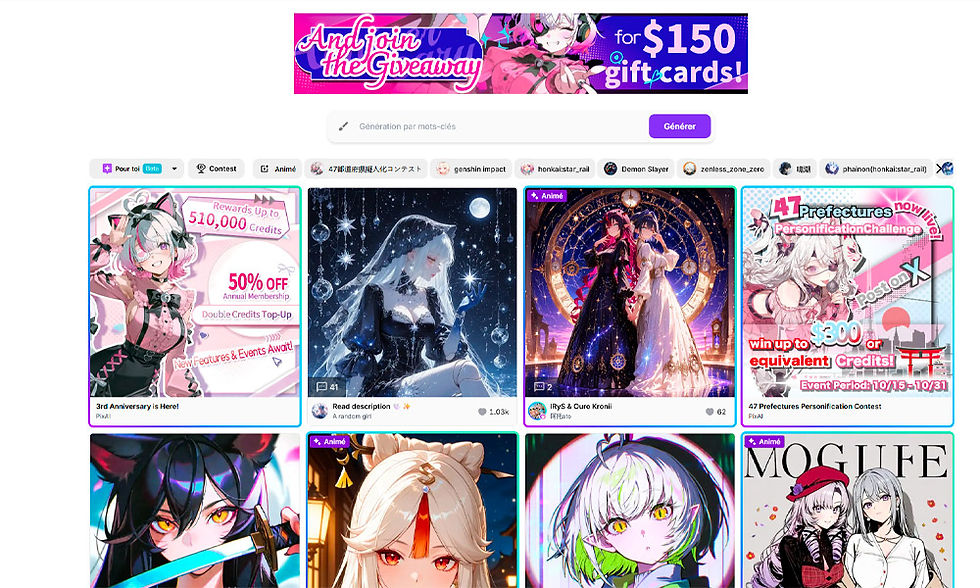
PixAI also offers a community gallery, similar to a social network for creators, where you can comment on, like, or "remix" other users' work.
Is PixAI a paid service?
PixAI is based on a freemium model. Basic access is free: it allows you to test most of the features and generate a limited number of images per day. Specifically, you are entitled to 10,000 credits per daily login, and generating an image will cost more or fewer credits depending on the desired quality, the number of parameters specified, etc. An image can cost anywhere from 1,500 credits to 3,500 credits, with several options included.
But to go further, such as generating animations, you need to upgrade to a paid subscription or purchase additional credits. You can pay monthly or annually, with a reduced price for the annual rate. Annual rates start at €5 per month, then €1,5 and finally €25.

Why is PixAI so appealing?
PixAI owes its success to its combination of ease of use, high-quality results, and a wealth of tools. Users don't need to be skilled at drawing or complex software to produce professional-quality images.
And thanks to its active community, the platform has become a place for learning, inspiration, and exchange.
FAQ
Is PixAI free? Yes, the free version offers basic access. Paid subscriptions allow you to use advanced models and obtain high-resolution renderings.
Can images created with PixAI be used commercially? In most cases, yes. Users retain the rights to use their creations, unless otherwise specified for a specific model.
What is the difference between PixAI and Midjourney? PixAI is more oriented towards the world of anime and illustration, while Midjourney focuses on realistic and abstract artistic renderings.
Is there a PixAI mobile app? Not yet, but the web version is responsive and works perfectly on smartphones and tablets.


Comments